Montag, 22. April 2013

MIN FILTER - MATLAB CODE

MIN FILTER
  •      To find the darkest points in an image.
  •       Finds the minimum value in the area encompassed by the filter.
  •       Reduces the salt noise as a result of the min operation.
  •       The 0th percentile filter is min filter.

MATLAB CODE:

%READ AN IMAGE
A = imread('board.tif');
A = rgb2gray(A(1:300,1:300,:));
figure,imshow(A),title('ORIGINAL IMAGE');

%PREALLOCATE THE OUTPUT MATRIX
B=zeros(size(A));

%PAD THE MATRIX A WITH ZEROS
modifyA=padarray(A,[1 1]);

        x=[1:3]';
        y=[1:3]';
       
for i= 1:size(modifyA,1)-2
    for j=1:size(modifyA,2)-2
      
       %VECTORIZED METHOD 
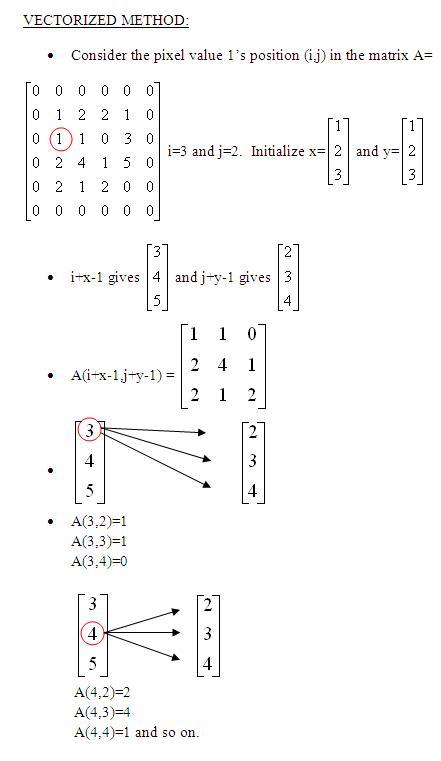
       window=reshape(modifyA(i+x-1,j+y-1),[],1);

       %FIND THE MINIMUM VALUE IN THE SELECTED WINDOW
        B(i,j)=min(window);

    end
end

%CONVERT THE OUTPUT MATRIX TO 0-255 RANGE IMAGE TYPE
B=uint8(B);
figure,imshow(B),title('IMAGE AFTER MIN FILTERING');


MAX FILTER - MATLAB CODE

  • To find the brightest points in an image.
  •  Finds the maximum value in the area encompassed by the filter.
  •  Reduces the pepper noise as a result of the max operation.
  •  The 100th percentile filter is max filter. Check the 50thpercentile filter i.e the median filter.


MATLAB CODE:

%READ AN IMAGE
A = imread('board.tif');
A = rgb2gray(A(1:300,1:300,:));
figure,imshow(A),title('ORIGINAL IMAGE');

%PREALLOCATE THE OUTPUT MATRIX
B=zeros(size(A));

%PAD THE MATRIX A WITH ZEROS
modifyA=padarray(A,[1 1]);

        x=[1:3]';
        y=[1:3]';
       
for i= 1:size(modifyA,1)-2
    for j=1:size(modifyA,2)-2
      
       %VECTORIZED METHOD
       window=reshape(modifyA(i+x-1,j+y-1),[],1);

       %FIND THE MAXIMUM VALUE IN THE SELECTED WINDOW
        
       B(i,j)=max(window);
   
    end
end

%CONVERT THE OUTPUT MATRIX TO 0-255 RANGE IMAGE TYPE
B=uint8(B);
figure,imshow(B),title('IMAGE AFTER MAX FILTERING');


Donnerstag, 14. März 2013

2-D Inverse Discrete Cosine Transform


Consider the result obtained after DCT. (Check 2d-DCT )
Apply Inverse Discrete Cosine Transform to obtain the original Image.


MATLAB CODE:

%2-D INVERSE DISCRETE COSINE TRANSFORM
%PREALLOCATE THE MATRIX
A=zeros(size(B));
Temp=zeros(size(B));
[M N]=size(B);

x=1:M;
x=repmat(x',1,N);
y=repmat(1:N,M,1);

figure,
imshow(log(abs(B)),[]);colormap(jet);title('After DCT');


for i=1:M
    for j = 1: N
   
        if(i==1)
          AlphaP=sqrt(1/M);
        else
          AlphaP=sqrt(2/M);
        end
       
        if(j==1)
          AlphaQ=sqrt(1/N);
        else
          AlphaQ=sqrt(2/N);
        end
                 
        cs1=cos((pi*(2*x-1)*(i-1))/(2*M));
        cs2=cos((pi*(2*y-1)*(j-1))/(2*N));
        Temp=B.*cs1.*cs2*AlphaP*AlphaQ;
              
          A(i,j)=sum(sum(Temp));
    end
end
%OUTPUT
figure,
imshow(abs(A),[0 255]);title('Image after IDCT');


Mittwoch, 13. März 2013

2-D Discrete Cosine Transform


DCT is a technique for converting a signal into elementary frequency components.
It is widely used in image compression. Check Inverse discrete cosine transform for the reverse process.


MATLAB CODE:


%CONSIDER A MATRIX


A=[4 2 9 60; 7 10 5 77;88 66 44 3];


%PREALLOCATE THE MATRICES


B=zeros(size(A));


Temp=zeros(size(A));


display(A);


%FIND THE SIZE OF THE
MATRIX


[M N]=size(A);


for i=1:M


    for j=1:N


        if(i==1)


          AlphaP=sqrt(1/M);


        else


          AlphaP=sqrt(2/M);


        end


        if(j==1)


          AlphaQ=sqrt(1/N);


        else


          AlphaQ=sqrt(2/N);


        end


For A(1,1),  m=1 and n=1. If m= 1 then AlphaP=sqrt(1/M)=0.5774
If n=1 then AlphaQ=sqrt(1/N)=0.5000


For A(2,3),m=1 and n=3. AlphaP=sqrt(2/M)=0.8165
 AlphaQ =  sqrt(2/N) = 0.7071


Temp=0;


       for x=1:M


            for y=1:N


                   cs1=cos((pi*(2*x-1)*(i-1))/(2*M));


                cs2=cos((pi*(2*y-1)*(j-1))/(2*N));


                Temp=Temp+(A(x,y)*cs1*cs2);


             end


        end


       B(i,j)=AlphaP*AlphaQ*Temp;


    end


end


%2-D discrete Cosine Transform


display(B);


EXAMPLE 2


%2-D DISCRETE COSINE TRANSFORM FOR AN IMAGE


%READ THE IMAGE
I=imread('coins.png');
I=I(90:150,140:210);


A=double(I);

%PREALLOCATE THE MATRIX
B=zeros(size(A));
Temp=zeros(size(A));
[M N]=size(A);


%
x=1:M;
x=repmat(x',1,N);
y=repmat(1:N,M,1);


for i=1:M
    for j = 1: N
   
        if(i==1)
          AlphaP=sqrt(1/M);
        else
          AlphaP=sqrt(2/M);
        end
       
        if(j==1)
          AlphaQ=sqrt(1/N);
        else
          AlphaQ=sqrt(2/N);
        end


        cs1=cos((pi*(2*x-1)*(i-1))/(2*M));
        cs2=cos((pi*(2*y-1)*(j-1))/(2*N));
        Temp=A.*cs1.*cs2;
              
      
        B(i,j)=AlphaP*AlphaQ*sum(sum(Temp));
    end
end

%OUTPUT
figure,
subplot(2,1,1);imshow(I);title('Original Image');
subplot(2,1,2),imshow(log(abs(B)),[]);
colormap(jet);title('After DCT');


Montag, 5. November 2012

Bit-Plane Slicing


            Digitally, an image is represented in terms of pixels.
These pixels can be expressed further in terms of bits.
Consider the image ‘coins.png’ and the pixel representation of the image.

Consider the pixels that are bounded within the yellow line. The binary formats for those values are (8-bit representation)


The binary format for the pixel value 167 is 10100111
Similarly, for 144 it is 10010000
This 8-bit image is composed of eight 1-bit planes.
Plane 1 contains the lowest order bit of all the pixels in the image.

And plane 8 contains the highest order bit of all the pixels in the image.

Let’s see how we can do this using MATLAB

A=[167 133 111
      144 140 135
      159 154 148]


B=bitget(A,1);  %Lowest order bit of all pixels
‘bitget’ is a MATLAB function used to fetch  a bit from the specified position from all the pixels.
B=[1 1 1
      0 0 1
      1 0 0]
B=bitget(A,8);%Highest order bit of all pixels
B=[1 1 0
      1 1 1 
      1 1 1]

MATLAB CODE:
%Bit Planes from 1 to 8. Output Format: Binary

A=imread('coins.png');

B=bitget(A,1);
figure,
subplot(2,2,1);imshow(logical(B));title('Bit plane 1');

B=bitget(A,2);
subplot(2,2,2);imshow(logical(B));title('Bit plane 2');

B=bitget(A,3);
subplot(2,2,3);imshow(logical(B));title('Bit plane 3');


B=bitget(A,4);
subplot(2,2,4);imshow(logical(B));title('Bit plane 4');


B=bitget(A,5);
figure,
subplot(2,2,1);imshow(logical(B));title('Bit plane 5');


B=bitget(A,6);
subplot(2,2,2);imshow(logical(B));title('Bit plane 6');


B=bitget(A,7);
subplot(2,2,3);imshow(logical(B));title('Bit plane 7');


B=bitget(A,8);
subplot(2,2,4);imshow(logical(B));title('Bit plane 8');


Image reconstruction using n bit planes.

1.     The nth plane in the pixels are multiplied by the constant 2^n-1
2.     For instance, consider the matrix
A= A=[167 133 111
      144 140 135
      159 154 148] and the respective bit format

         
3.     Combine the 8 bit plane and 7 bit plane.
For 10100111, multiply the 8 bit plane with 128 and 7 bit plane with 64.
(1x128)+(0x64)+(1x0)+(0x0)+(0x0)+(1x0)+(1x0)+(1x0)=128

4.     Repeat this process for all the values in the matrix and the final result will be
[128 128 64
 128 128 128
128 128 128]


MATLAB CODE:
%Image reconstruction by combining 8 bit plane and 7 bit plane
A=imread('coins.png');
B=zeros(size(A));
B=bitset(B,7,bitget(A,7));
B=bitset(B,8,bitget(A,8));
B=uint8(B);
figure,imshow(B);

Image reconstructed using 8 and 7 bit planes
Explanation:
‘bitset’ is used to set  a bit at a specified position. Use ‘bitget’ to get the bit at the positions 7 and 8 from all the pixels in matrix A and use ‘bitset’ to set these bit values at the positions 7 and 8 in the matrix B.


%Image reconstruction by combining 8,7,6 and 5 bit planes
A=imread('coins.png');
B=zeros(size(A));
B=bitset(B,8,bitget(A,8));
B=bitset(B,7,bitget(A,7));
B=bitset(B,6,bitget(A,6));
B=bitset(B,5,bitget(A,5));
B=uint8(B);
figure,imshow(B);
Image reconstructed using 5,6,7 and 8 bit planes


              Also check  bit plane compression.